About this guide
This article was created by the InboxAlly team, drawing on insights from email deliverability consultants who work closely with SaaS, e-commerce, and transactional messaging platforms on a daily basis. Our goal is to help businesses understand the difference between transactional and marketing emails and keep them out of the spam folder.
These days, our inboxes are packed with emails. Some are quick and to the point—like order confirmations or shipping updates—while others are designed to grab your interest with promotions or discounts. Both have their place, but they clearly play very different roles.
Transactional emails keep you informed, while marketing emails keep you engaged and excited about what’s next. But if you mix the two carelessly, things can go very wrong. Important updates can be lost in the noise, and marketing emails might not even make it to the inbox.
In this article, we’ll explore what makes these email types unique, why keeping them in their lanes matters, and how they can work together to do great things for your business. Let’s begin!
Key Takeaways
- Transactional emails are triggered by user actions and don’t require opt-in; marketing emails are sent in bulk to opted-in recipients and must include an unsubscribe option.
- Transactional emails typically produce open rates of 70% or higher, while marketing emails average 10–30%, largely because inbox providers scrutinize promotional content more heavily.
- Separating transactional and marketing emails onto different subdomains or IPs protects your sender reputation since a spike in marketing complaints won’t drag down critical transactional deliverability.

What Are Transactional Emails?
Transactional emails might not be all that fun, but they’re absolutely essential for keeping customers informed and happy. They are designed to give people exactly what they need right when they need it—whether it’s password reset requests or confirmation that their new shoes are on the way.
Here are some traits of transactional emails to keep in mind:
- Triggered by User Actions: Transactional emails respond directly to user activity—sign up for an account or make a purchase, and they follow up with what you need, like a welcome email or an order confirmation. Because transactional emails are user-triggered, they do not require an opt-in from the recipient.
- Personalization: Including details like the customer’s name or order specifics makes these emails feel relevant and meaningful, which in turn creates a better user experience.
- Important Info: From shipping updates to payment confirmations or password reset links, they deliver the important details customers rely on.
These emails handle many situations where timely communication is non-negotiable. Each one serves a specific purpose to make sure the message gets across exactly when needed.
Examples of transactional emails include:
- Password resets with secure, time-sensitive links.
- Order confirmations detailing purchased items and payment info.
- Shipping notification emails complete with tracking numbers and delivery updates.
- Account updates notifying users of changes to their details or subscriptions.
- Onboarding emails sent to new users to guide them through initial setup or registration.
- Verification email used to confirm a user’s email address or enable two-factor authentication.
Ultimately, the role of transactional emails is simple but vital. They build trust by delivering the updates customers expect, keeping everything running smoothly.
Why They Matter
Transactional emails go beyond basic updates—they’re an integral touchpoint for building trust and maintaining professionalism. When customers get timely, accurate information like a shipping update or an account change, it shows reliability. These emails also reflect your brand’s personality, subtly reinforcing your voice and showing that every interaction, no matter how small, matters.
What Are Marketing Emails?
On the flip side, we’ve got marketing emails—the driving force behind engagement and growth. These messages are built to promote products, services, or events to a wide audience, not just one person. Unlike transactional emails, which respond to individual actions, marketing emails are sent in bulk as part of larger, strategic email campaigns.
Here are a few key characteristics of marketing emails:
- Bulk Distribution: These emails go out to large groups which can be specific segments or your entire email list. They’re built for scale.
- Promotional Intent: The goal of a marketing email is to grab attention, encourage action, and keep your brand in the spotlight. Whether it’s announcing a sale or sharing a new blog post, their purpose is to drive engagement and conversions.
- Engagement Focus: Marketing emails often include eye-catching visuals, punchy subject lines, and clear call-to-action (CTA) buttons. They’re designed to get clicks and encourage responses.
While not all marketing emails are directly trying to sell something, they represent every business’s effort to keep their latest products, services, or updates fresh in their minds. There are several types of marketing emails:
- Newsletters: Regular updates with valuable content, industry insights, and company news, all aimed at keeping the audience informed and engaged.
- Promotional Offers: Discounts, limited-time deals, or product launches designed to encourage immediate action.
- Product Announcements: Announcements about new products or features to build excitement and draw attention.
- Event Invitations: Invitations to webinars, workshops, or in-person events to deepen engagement.
Role in Nurturing Leads and Building Brand Awareness
Marketing emails are your brand’s way of keeping the conversation going. They help build relationships, keep you on your audience’s radar, and move leads closer to becoming loyal customers. When done right, they don’t just sell—they add value, build trust, and show you care. With some segmentation and personalization, these emails feel relevant and personal, leaving a lasting impression on your readers.
Transactional and Marketing Emails: Two Distinct Roles
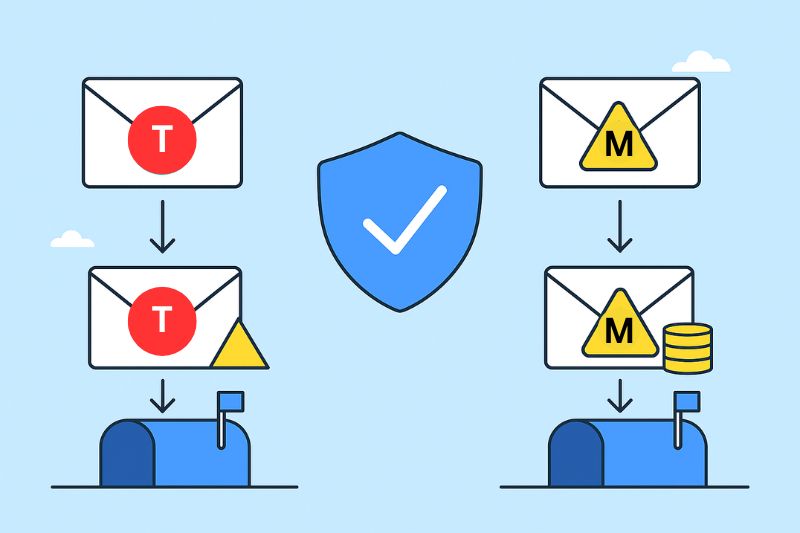
Transactional and marketing emails are both essential but serve very different purposes. Typically sent from separate subdomains to protect sender reputation, their main differences can be summarized as follows:
| Aspect | Transactional Emails | Marketing Emails |
| Purpose | Updates or confirmations (e.g., order confirmation, password reset) | Engage existing customers, promote products, or encourage sales |
| Triggers | Sent automatically when a user does something (e.g., makes a purchase) | Sent at specific times as part of a planned campaign. |
| Audience | Sent to individual users with personalized content | Sent to larger groups based on segments. |
| Content Focus | Provides important, personal information | Offers promotions or content meant to grab attention |
| Subdomains | Usually sent from a dedicated subdomain for better deliverability | Sent from a separate subdomain to prevent issues with email delivery |
The differences between transactional emails and marketing emails show up in performance too. Transactional emails tend to have sky-high open rates (around 70% or more) because recipients expect and value their content.
Marketing emails, on the other hand, usually see open rates in the 10–30% range, depending on how attention-grabbing the subject lines and content are. They also face tougher deliverability hurdles since inbox providers keep a closer eye on promotional messages.
Legal requirements add another layer of distinction. Marketing emails must comply with strict rules, like opt-in agreements and a clear unsubscribe link, to meet regulations like GDPR and the CAN-SPAM Act. Transactional emails don’t have these same obligations, but they still need to be clear, transparent, and professional.
Why It’s Important to Separate Transactional and Marketing Emails
The best approach in email marketing is to treat transactional and marketing emails differently. This prevents the typical issues that arise when transactional emails are lumped together with less favorable marketing emails. But what exactly makes separating them so beneficial?
Deliverability Benefits
The main reason for separating transactional and marketing emails is to protect deliverability. Transactional emails like password resets or order confirmations are important and need to arrive on time.
If they share the same infrastructure as marketing emails, which often have lower engagement rates, there’s a higher risk they’ll be flagged as spam. That’s why many teams opt for a dedicated transactional email service to keep these streams cleanly separated from the start.
Managing Subscriber Preferences
As mentioned, marketing emails have to follow strict rules, like those under GDPR or the CAN-SPAM Act, which require clear opt-ins and easy ways for people to unsubscribe.
Transactional emails, however, don’t fall under the same guidelines since they’re used for completing user actions. Keeping them separate is the best way to respect subscriber preferences and get important messages through when needed.
Protecting Sender Reputation
Email providers look at things like engagement rates, spam complaints, and bounce rates to evaluate your sender reputation. Separate IPs, domains, or subdomains for transactional and marketing emails make sure that any ups and downs in your promotional emails don’t mess with the deliverability of transactional messages.
If your sender reputation is already damaged, separating your sending streams is the first step toward rebuilding it.
How Marketing Volume Spikes Can Affect Transactional Email
A large promotional campaign can create a sudden spike in sending volume, and if that campaign shares infrastructure with your transactional traffic, the consequences can spill over. Inboxes may respond to the spike with throttling or temporary delivery delays while they reassess the sender’s behavior; if that happens, order confirmations, verification emails, or password-reset links can get caught in the same slowdown and arrive later than the user expects.
This isn’t guaranteed to happen every time you run a campaign, but it’s enough of a risk that separating your infrastructure removes it entirely rather than hoping it doesn’t come up.
How to Separate Your Email Infrastructure
A few practical steps make the separation:
- Use distinct subdomains. For example, mail.yourcompany.com for transactional messages and news.yourcompany.com for marketing campaigns.
- Authenticate both streams independently with SPF, DKIM, and DMARC.
- Set sending and throttling rules for marketing campaigns so volume spikes stay predictable.
- Monitor reputation and deliverability separately for each stream rather than as one blended number.
- Consider separate IP addresses or IP pools once your volume and operational needs justify the added complexity. It’s not a requirement for every sender, just a natural next step for higher-volume ones.

Can Transactional Emails Include Marketing Content?
It’s tempting to slip a discount code into a receipt or a product recommendation into a shipping update, but this deserves more caution than it usually gets. The primary purpose of a transactional email needs to stay clear, and the essential information (the reset link, the order status, the confirmation) should remain front and center.
Sensitive transactional messages, like password resets, security alerts, and verification emails, are best kept entirely functional with no promotional content at all. For lower-stakes transactional emails, like order confirmations, a small amount of relevant promotional content isn’t automatically disqualifying, but how a message gets classified generally depends on its primary purpose, presentation, and the regulations that apply in your jurisdiction, not just the presence of any promotional line. If you’re routinely adding marketing content to transactional sends, it’s worth getting legal guidance on where that line sits for your business.
Keeping your branding consistent between both types of emails is a different matter entirely, and still worth doing. Tone, design, and voice can stay aligned without turning a transactional email into a marketing one.
Deliverability Challenges for Transactional and Marketing Emails
While it might seem easier to lump all emails together, keeping transactional and marketing emails separate can do wonders for your email deliverability. Why? Because email service providers (ESPs) handle these two types very differently. Transactional emails often get priority placement in inboxes. Marketing emails, on the other hand, face tougher scrutiny due to their promotional nature, especially when sent in bulk.
Using dedicated IP addresses or domains for each email type helps protect your sender reputation. If a marketing campaign triggers unsubscribes or spam complaints, your transactional emails stay unaffected. This way, you can keep delivering important messages without breaking your customers’ trust.
Emails need good deliverability to get the job done. Transactional emails must be quick and dependable, while marketing emails need to pass spam filters and keep your reputation intact. InboxAlly can help you nail both. Give it a try and see the results firsthand.
How to Measure Transactional vs Marketing Email Deliverability
Transactional and marketing emails succeed on different metrics, and measuring them the same way makes it easy to misread what’s actually going on. Here’s how the transactional vs marketing deliverability differences show up when you look at performance:
| Transactional email priorities | Marketing email priorities |
|---|---|
| Delivery speed and latency | Inbox placement |
| Delivery failures and bounce rates | Spam complaint rates |
| Reliability during peak demand | Unsubscribe rates |
| Authentication and security | Engagement by segment |
| Consistent delivery of time-sensitive messages | List quality and suppression |
| Monitoring by message type | Consistent sending volume |
Final Thoughts
To wrap it up, here’s the bottom line: knowing how to manage your transactional and marketing emails is smart and a must for keeping the lines of communication open, building trust, and helping your business thrive. Whether you’re confirming an order or rolling out a promo, treating these two differently ensures your customers stay on track, and your sender reputation stays strong!
And if you’re ready to take your email deliverability and reputation to the next level, give InboxAlly a try! It’ll help your emails land in your customers’ inboxes every time!